Set your availability
Choose the dates venues can consider for your band.
Before you start, sign in to your band account. Use Availability to keep the dates you can play up to date.
Choose which dates venues can consider
- Open Availability from the menu.
- If asked to choose a preference, select Only dates I add to list dates you can play, or Any date except those I block if you usually have dates free. If you already have a preference, use the Available / Unavailable switch to choose which list to work on.
- Enter a date and choose Add date (Add on a small screen). In the first mode, you’re adding an available date. In the second, you’re blocking an unavailable date.
- Use Remove beside a date when your plans change.
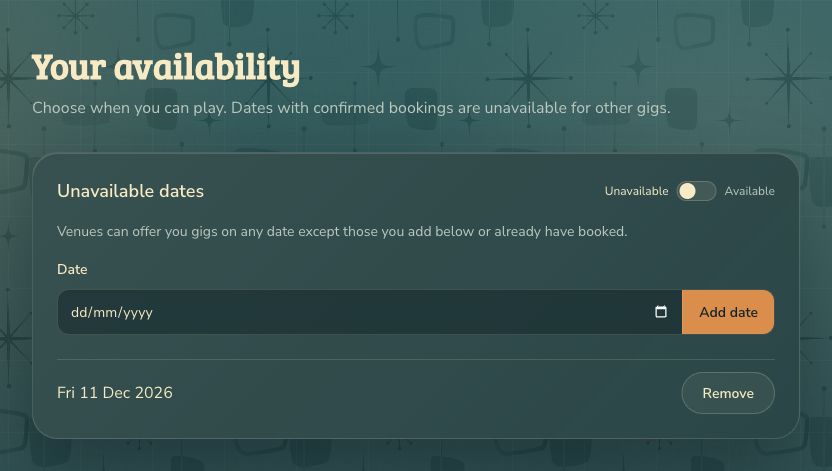
The switch saves your preference immediately. Available means only dates you add; Unavailable means any date except those you block. Your saved dates stay in their respective lists when you switch. Check the heading before adding a date.
How your dates affect gigs
Venues can find you for dates your preference allows. Dates with confirmed bookings are unavailable for other gigs. To block a gig agreed elsewhere, add it under Unavailable, then switch back to your preferred mode. Blocked dates also prevent repeat offers, even in Available mode.
When you update your dates, suitable new matches can be found in the next regular check. A match that is no longer available cannot receive a new offer. Updating availability does not cancel a confirmed booking; contact the venue and use the booking’s cancellation option if needed.
Venues you’ve played for can also invite you back on a date you have not listed, provided it is not blocked or already booked. You still decide whether to accept.
If something goes wrong
Past dates cannot be added. If a date does not appear, check the selected mode and any message beside the date field. In Only dates I add, an empty list means there are no dates listed as available. In Any date except those I block, an empty list leaves dates open unless already booked.